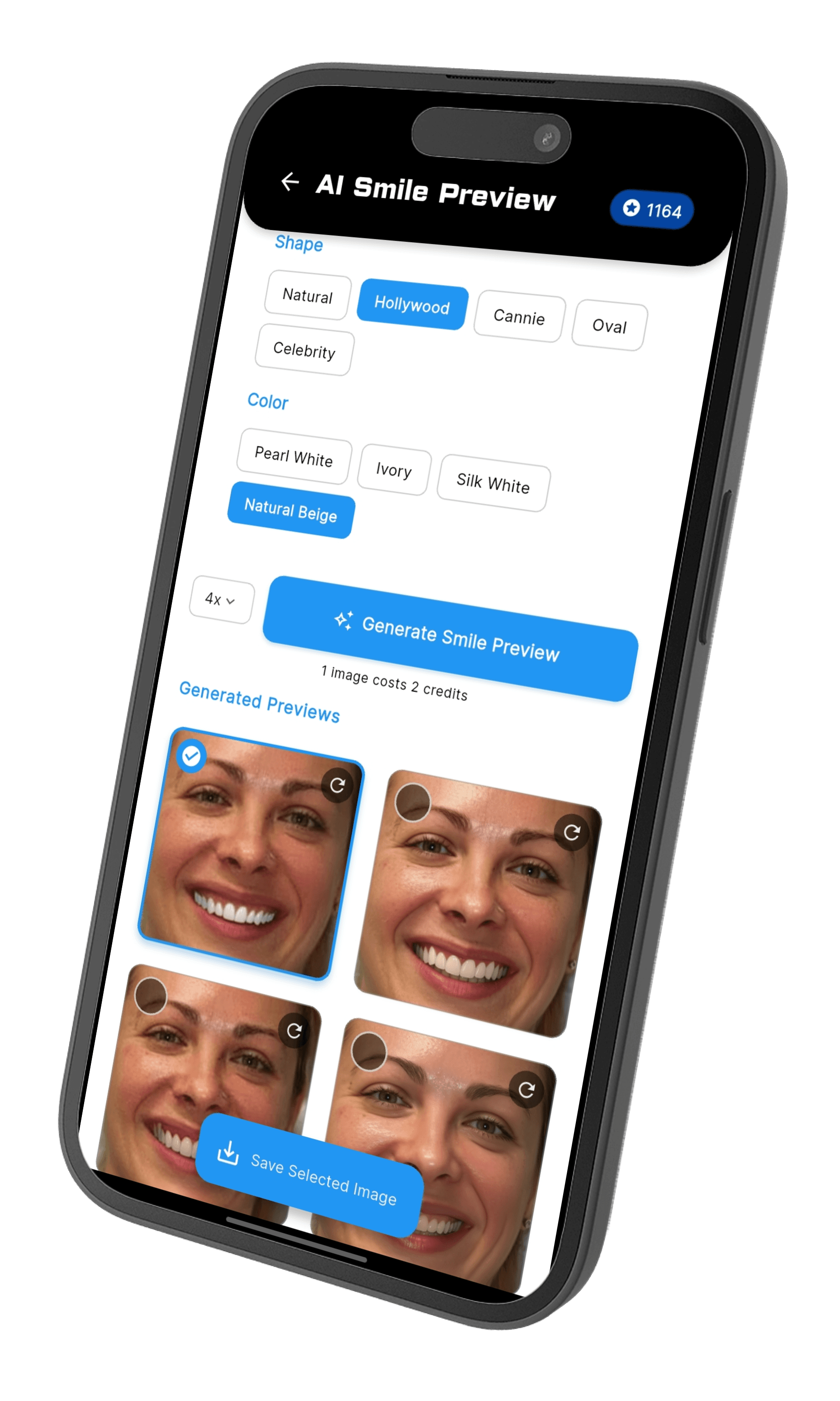
Download Teethsi on iOS or Android, upload a clear front-facing smile photo, choose a veneer style and shade option, and the app generates an AI smile preview in about 10–30 seconds.
Teethsi · Veneers AI App for iOS & Android
Instant AI Veneer & Smile Preview on Your Photo
Upload a front-facing smile photo in Teethsi (Veneers AI) to compare veneer shapes, natural or brighter shades, and straight-teeth smile simulations in 10–30 seconds before visiting a dentist.


How Teethsi (Veneers AI) Works
Preview dental veneer styles, tooth symmetry, and smile shades on your own photo in three simple steps.
Quick Answer · Teethsi (Veneers AI)
What is Teethsi (Veneers AI) and what can you preview?
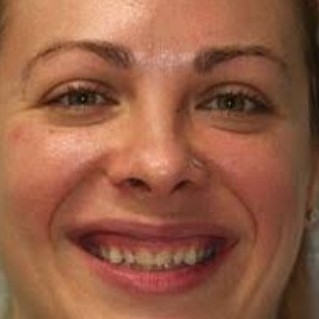
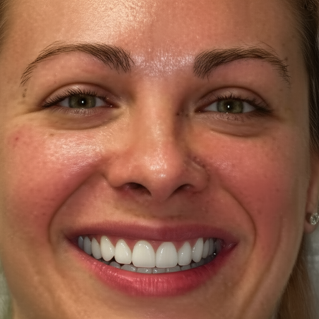
Teethsi (also searched as Veneers AI) is an iOS and Android AI veneer and smile simulation app. Upload a well-lit, front-facing smile photo to generate visual previews of veneer shapes, shade brightness, and straighter tooth alignment in 10–30 seconds—with encrypted photo storage and user-controlled deletion.
AI Veneer Style & Shade Try-On
Compare natural enamel shades against brighter smile finishes directly on your own facial proportions instead of guessing from generic clinic galleries.
Straight-Teeth & Smile Makeover Previews
Explore how balanced tooth alignment, edge contour, and veneer proportions look on a clear front-facing photo before scheduling a cosmetic consultation.
Encrypted Photo Handling & Deletion
Uploaded smile photos are encrypted and never shared with third parties. You can delete your photos and account data anytime following our Delete Guide.
Built to Support Dentist Conversations
Teethsi provides cosmetic visualization previews—not dental diagnosis or medical advice. Bring saved previews to a licensed dentist to review enamel prep and bite fit.
Veneer & Smile Simulation Library
AI Veneer, Shade & Consultation Guides
AI Veneer Simulator · Teethsi
Preview veneers on your own smile with an AI veneer simulator
See how dental veneers look on your own face before booking a dentist consultation. Upload a clear smile photo in Teethsi (Veneers AI) on iOS or Android to preview styles and shades.
Virtual Try-On · Smile Preview
Virtual veneers try-on from a single smile photo
Try on virtual veneers from your phone before committing to permanent dental work. Explore natural, rounded, and bright veneer styles with Teethsi on iOS and Android.
Veneer App · iOS & Android
A dedicated veneer app built for instant smile previews
Looking for a dedicated veneer app? Teethsi (Veneers AI) lets you preview veneer styles and dental shades from a photo on iOS and Android in seconds.
Educational Guide · Veneer Materials
Composite vs porcelain veneers: key differences to discuss with your dentist
Compare composite resin bonding and porcelain dental veneers: longevity, reversibility, office visits, and how to preview your ideal smile shape first with Teethsi.
Educational Guide · Removable vs Permanent
Snap-on veneers vs permanent veneers: compare before you buy
Comparing removable snap-on veneers and bonded dental veneers? Learn the practical trade-offs and preview how veneers look on your own face with Teethsi first.
AI Smile Makeover · Photo Simulator
Explore an AI smile makeover on your own photo
Curious what a smile makeover could look like on your face? Upload a clear photo in Teethsi (Veneers AI) on iOS & Android to preview veneer styles and shades instantly.
Shade Preview · Natural vs Bright
Compare natural vs bright tooth shades on your own smile
Unsure how bright your smile should be? Learn how dental shade selection works and preview subtle natural shades vs brighter veneer tones on your photo with Teethsi.
Patient Planning · Consultation Checklist
What drives dental veneer cost—and what to ask at your consultation
Understand what drives dental veneer pricing (material, tooth count, lab work, and location), what questions to ask your dentist, and how to preview your smile first.
Frequently Asked Questions
Clear answers about Teethsi (Veneers AI) smile simulations, photo privacy, and iOS & Android apps.
Use a sharp, well-lit, front-facing daylight photo showing your natural smile and upper teeth without heavy shadows or filters.
Yes. You can generate multiple previews to compare natural enamel tones, brighter shades, veneer shapes, and straighter-looking smile proportions on your own face.
No. Teethsi creates cosmetic visualizations to help you explore aesthetic preferences. Always consult a licensed dentist to evaluate enamel health, bite alignment, and clinical treatment options.
Yes. Uploaded photos are encrypted and never shared with third parties, and you can delete your uploaded photos and account data anytime using the steps on our Delete Guide (/deleteguide).
Yes. Teethsi (Veneers AI) is free to download on the Apple App Store for iOS and on Google Play for Android.